
Coordinating technicians across multiple sites is rarely as simple as it looks. Someone calls in sick, a repair takes longer than planned, and suddenly the day’s schedule needs reshuffling on the fly. At OPUSm AG, we work with service organisations who are tired of juggling this manually across spreadsheets and phone calls. SAP Field Service gives dispatchers a live, connected view of who’s available, where, and with what skills, so jobs go to the right person the first time.
The trouble is, most service teams don’t lack effort. They lack visibility. Job details live in one system, technician calendars in another, and customer history somewhere else entirely, so dispatchers end up piecing things together before every call-out. That’s the disconnect we see most often, and it’s exactly where a properly configured field service setup earns its keep: pulling scheduling, mobile work, and reporting into one connected process instead of three or four disjointed ones, without pretending the human side of dispatching ever fully goes away.
What Does Field Service Actually Change in Day-to-Day Dispatching?
At OPUSm AG, we set up SAP Field Service so dispatchers see technician location, skills, and open jobs together on one dashboard, instead of switching between separate tools. It doesn’t dispatch jobs for you. It gives your team the information to make faster, better-informed calls.
Scheduling and Dispatch From One Screen
Dispatchers can see technician availability, location, and skill set together, so jobs get assigned to whoever fits best rather than whoever happens to be free, though someone still needs to confirm the match makes sense.
Mobile Access for Technicians in the Field
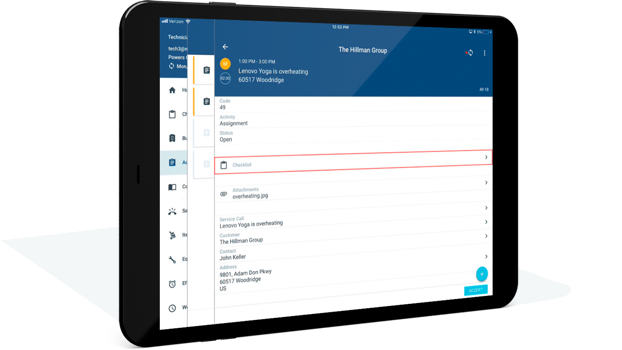
The mobile app puts job details, equipment history, and customer information in one place on the technician’s phone or tablet, working online or offline, so they aren’t hunting through emails before a visit.
Digital Reporting Replaces Paper Forms
Work reports, checklists, and customer sign-offs are completed on the app itself, which cuts down on paperwork after the job, though technicians still need to fill them in accurately on-site before moving to the next call.
Work Order and Inventory Visibility
Spare parts, vehicle stock, and return authorisations are tracked within the system, giving a clearer picture of what’s on hand, though stock counts still need to be checked and updated by hand periodically.
Connection to Existing ERP and CRM
Field service data can be linked to your ERP or CRM backend through an open API, so job and customer records stay aligned; connector setup and testing are still part of the project work.
How Does OPUSm AG Handle Gaps the Standard SAP Product Doesn’t Cover?
No standard software covers every scenario, and SAP Field Service is no exception. At OPUSm AG, we build and implement extensions that plug specific gaps, connecting to Outlook, Microsoft Teams, or third-party ERP systems, so the core setup fits how your team actually works, without a full custom build.
Scheduling Sync With Outlook
Our Outlook connector mirrors planned service visits into technicians’ calendars automatically, keeping SAP as the master record, though calendar syncing can occasionally lag if there’s a connectivity interruption on either end.
ERP and Documentation Connectors
We develop connectors to systems like Microsoft Dynamics, Abacus, and document management tools such as DocuWare, so service records land in the right place without manual re-entry, once the interface is configured and tested.
What Does Working With Us on an SAP Field Service Project Actually Look Like?
We don’t just hand over software and leave. Most projects start with a business case and requirements phase, so the scope is clear before anything gets built, followed by configuration, coordination between the teams involved, and quality checks before go-live.
Once the system goes live, we train key users so your team can maintain it independently and provide documentation for reference. Ongoing support for the core SAP product then comes directly from the vendor.
Field service work will always need people who can think on their feet. What SAP Field Service does is give those people better information to work with, and that’s the part we focus on at OPUSm AG: setting it up properly, connecting it to what you already run, and staying involved past go-live. Ready to see what a properly connected field service setup could look like for your team? Get in touch with us today.


